You provide
- Product photos
- Condition / brand if known
Listing Content & Quality
Photos → listing draft. Copy, export, or push.
Upload product photos, confirm the match, then review title, bullets, description, and keywords. Copy, export, or push to connected Amazon when ready. Pro plan.
Quick start
You provide
You get
Draft title, bullets, description, and keywords for review.
Where
Create Listings → Snap to List. Push = connected Amazon.
Pro plan. Uses Snap to List / listing allowance.
Next step
Upload photos, confirm match, then copy or push.
Start with Snap to ListIn the seller panel
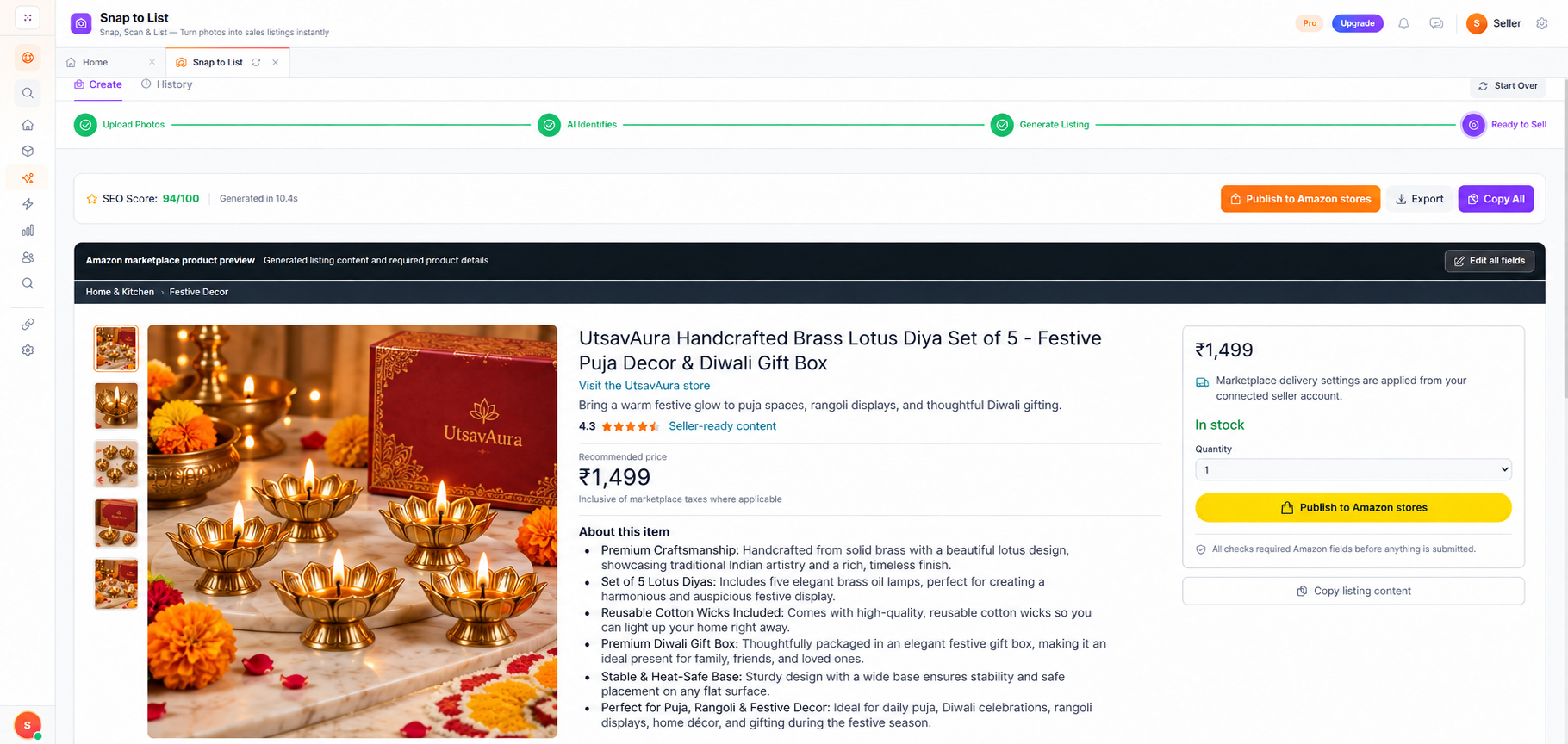
How it works
Add clear product, label, and feature images.
Check suggested product details.
Edit, then copy, export, or push to Amazon.
Build a draft from product images.
Title, bullets, description, keywords.
Take approved copy out of the tool.
Send to connected Amazon when enabled.
FAQ
Clear product photos Pro plan Connected Amazon to push
AI Listers provides drafts, analysis, estimates, or workflow guidance according to the service. Your team remains responsible for reviewing outputs, confirming product facts, and deciding what is ready to publish or use.