You provide
- Connected Amazon account
- Fix Your Products / inactive-listing reports
Connected Store Operations
Amazon listing errors and suppression risks from connected issue data.
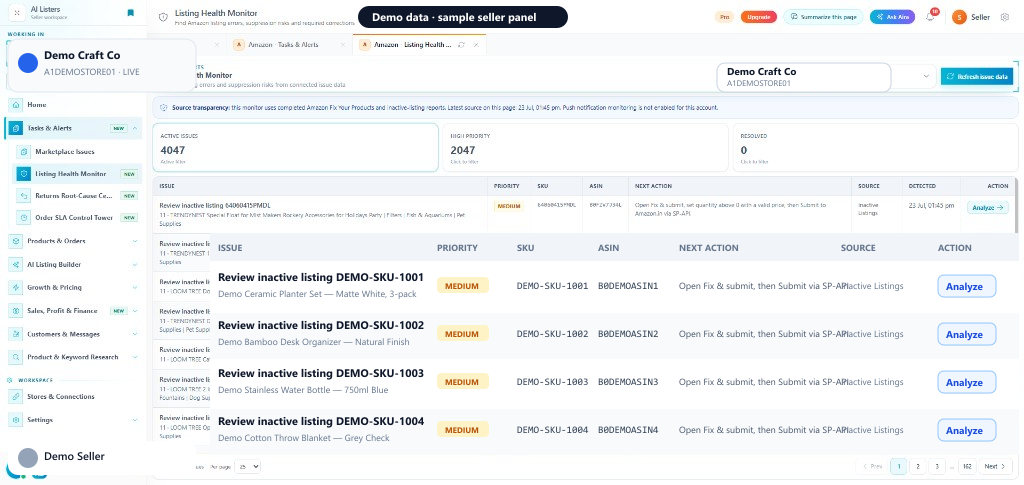
Listing Health Monitor uses completed Amazon Fix Your Products and inactive-listing reports. Filter Active issues, High priority, and Resolved — then Analyze an ASIN to review evidence and plan listing corrections.
Quick start
You provide
You get
Listing Health table with Active / High priority issues and Analyze.
Where
Amazon sidebar → Tasks & Alerts → Listing Health Monitor
Requires connected Amazon and completed issue reports.
Next step
Refresh issue data, then Analyze High priority ASINs.
Start with Listing Health MonitorIn the seller panel
How it works
Request Fix Your Products and inactive-listing reports, then Refresh issue data.
Switch between Active issues, High priority, and Resolved.
Open Analyze on an ASIN/SKU, review evidence, then edit and push only after seller review.
Active issues, High priority, and Resolved summary cards.
Built on Fix Your Products and inactive-listing report data.
Priority, SKU, ASIN, next action, source, detected date, Analyze.
Pull the latest completed Amazon issue reports into the monitor.
FAQ
Connected Amazon Seller Central account Completed Fix Your Products / inactive-listing reports
The service requires a supported connected account for live channel data or actions. AI Listers keeps supported actions inside the authenticated seller workflow, and your team should review the information and confirm any change before it is applied.