You provide
- Connected Amazon account
- Completed Amazon reports
Connected Store Operations
Amazon report signals → guided resolution → verified completion.
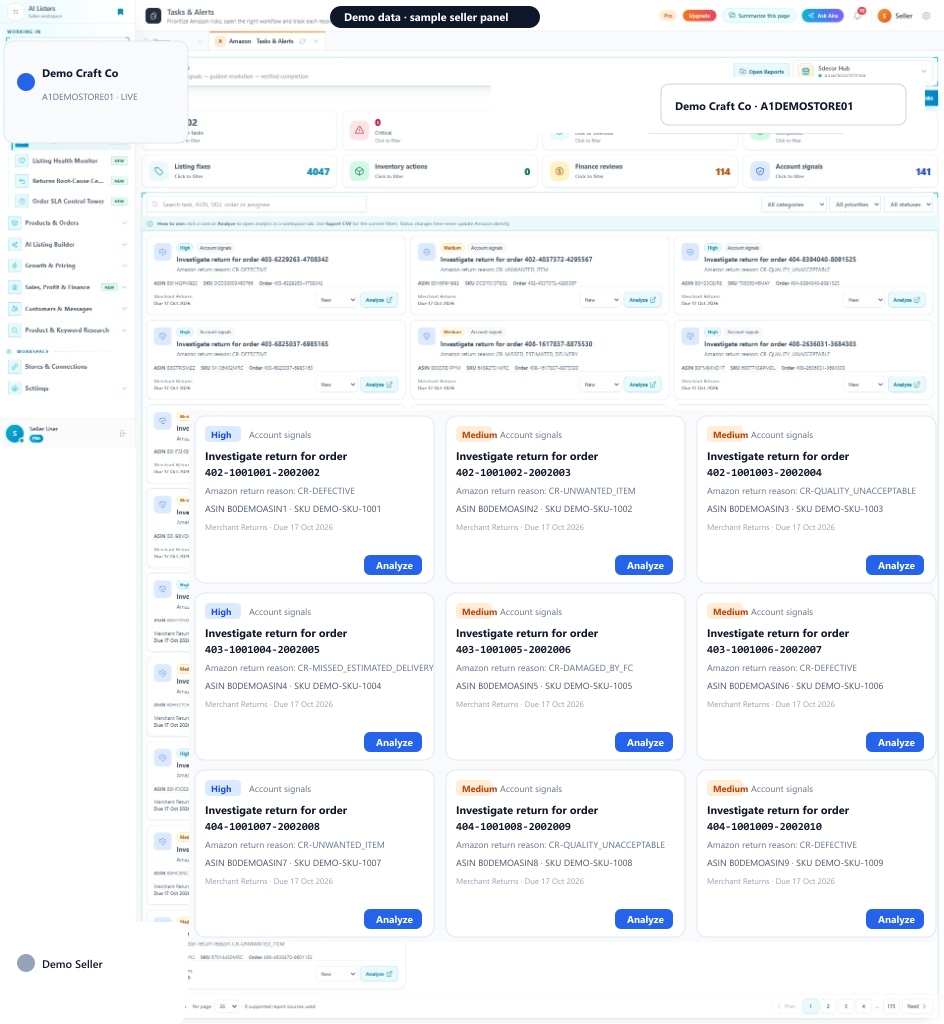
Marketplace Issues opens the seller-panel Tasks & Alerts action center. Filter Active, Critical, High, Due soon, and Completed tasks across Listing fixes, Inventory actions, Finance reviews, and Account signals — then click Analyze to work each case in a workspace tab.
Quick start
You provide
You get
Tasks & Alerts queue with Critical / High tasks and Analyze on each row.
Where
Amazon sidebar → Tasks & Alerts (Marketplace Issues)
Requires connected Amazon and report permissions.
Next step
Open Tasks & Alerts, clear Critical and Due soon first.
Start with Marketplace IssuesIn the seller panel
How it works
Authorize Amazon, complete supported reports, then open Tasks & Alerts (Marketplace Issues).
Use summary cards and Listing / Inventory / Finance / Account filters to focus work.
Click Analyze to open evidence and recommended next actions in a tab. Status changes stay local.
Active tasks, Critical, High priority, Due soon, Completed, and Finance reviews.
Listing fixes, Inventory actions, Finance reviews, and Account signals.
Issue, category, priority, SKU/ASIN, next action, and Analyze.
Open structured evidence for each Amazon report signal.
FAQ
Connected Amazon Seller Central account Supported report sync permissions
The service requires a supported connected account for live channel data or actions. AI Listers keeps supported actions inside the authenticated seller workflow, and your team should review the information and confirm any change before it is applied.