You provide
- Connected Amazon account
- Seller-fulfilled (MFN) orders
Connected Store Operations
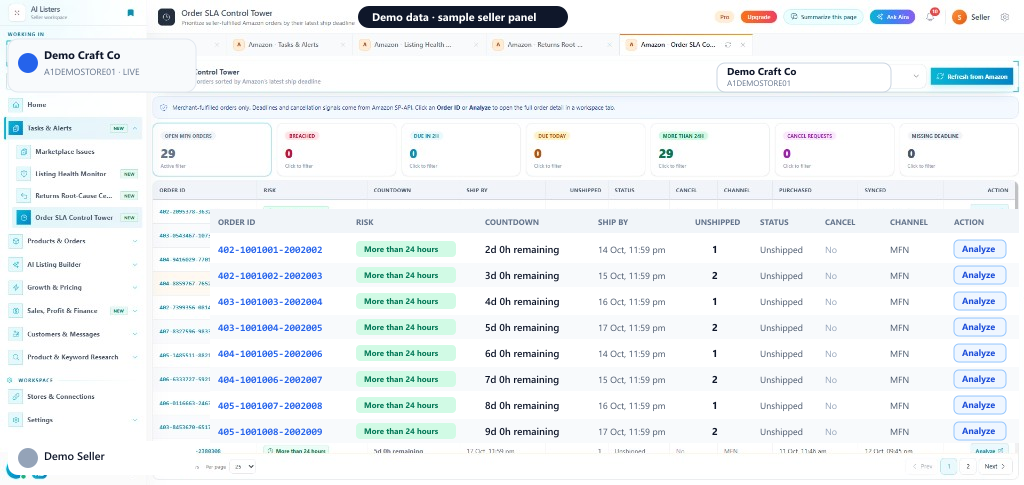
Seller-fulfilled orders sorted by Amazon’s latest ship deadline.
Order SLA Control Tower shows merchant-fulfilled (MFN) orders only. Filter Open MFN orders, Breached, Due in 2h, Due today, More than 24h, Cancel requests, and Missing deadline — then open Order ID or Analyze for full order detail.
Quick start
You provide
You get
Order SLA queues with countdown, risk badges, and Analyze.
Where
Amazon sidebar → Tasks & Alerts → Order SLA Control Tower
Requires connected Amazon with order permissions.
Next step
Refresh from Amazon, clear Breached and Due in 2h first.
Start with Order SLA Control TowerIn the seller panel
How it works
Sync seller-fulfilled unshipped orders for the selected Amazon account.
Start with Breached and Due in 2h, then Due today and cancel requests.
Click Order ID or Analyze to ship, cancel, or escalate before the deadline slips.
Open MFN, Breached, Due in 2h, Due today, More than 24h, Cancel requests, Missing deadline.
Shows remaining time or overdue duration against latest ship date.
SLA breached, Due within 2 hours, Due within 24 hours, and more.
Order ID / Analyze opens the full Amazon order detail tab.
FAQ
Connected Amazon Seller Central account Seller-fulfilled order access via SP-API
The service requires a supported connected account for live channel data or actions. AI Listers keeps supported actions inside the authenticated seller workflow, and your team should review the information and confirm any change before it is applied.