You provide
- Connected Amazon account
- Amazon return reports with order IDs
Connected Store Operations
Order-level return cases with reason, status and direct order investigation.
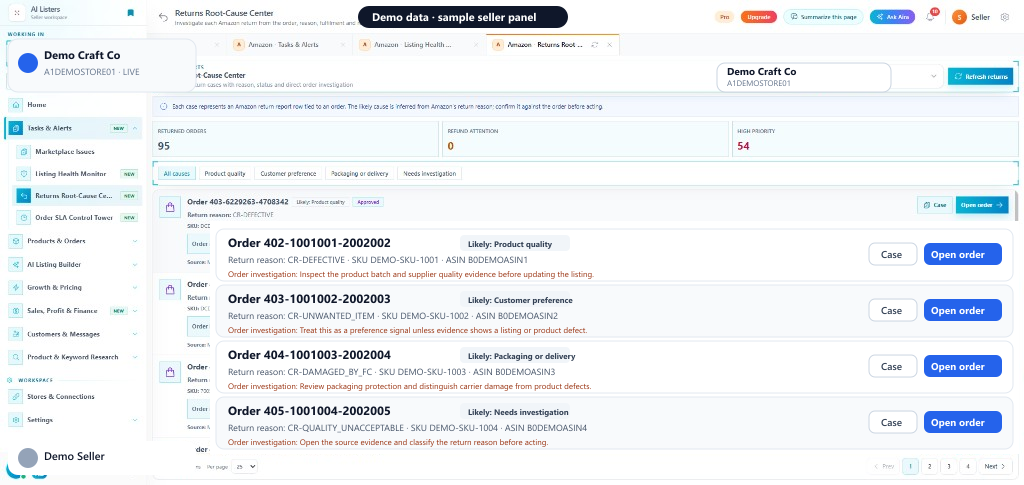
Returns Root-Cause Center turns each Amazon return report row into an order case. Filter by likely cause (Size or fit, Listing accuracy, Product quality, Packaging or delivery, Fulfilment error, and more), then open Case or Open order to investigate.
Quick start
You provide
You get
Return cases grouped by likely cause with Case and Open order.
Where
Amazon sidebar → Tasks & Alerts → Returns Root-Cause Center
Requires connected Amazon and returns report data.
Next step
Refresh returns, filter the top cause, then Open order.
Start with Returns Root-Cause CenterIn the seller panel
How it works
Finish Merchant Returns, SFP Returns, or FBA Returns reports that include order IDs, then Refresh returns.
Use All causes or Size or fit, Listing accuracy, Product quality, Packaging or delivery, Fulfilment error.
Open Case for evidence or Open order for fulfilment and customer context, then fix the repeated driver.
Size or fit, Listing accuracy, Product quality, Packaging or delivery, Fulfilment error, Customer preference.
Each row is a return report tied to an Amazon order ID.
Suggested next checks based on the inferred likely cause.
Jump to task analysis or the full order detail.
FAQ
Connected Amazon Seller Central account Merchant Returns / FBA Returns reports with order IDs
The service requires a supported connected account for live channel data or actions. AI Listers keeps supported actions inside the authenticated seller workflow, and your team should review the information and confirm any change before it is applied.